
Locations Help

Personal Online Banking Login

Refer A Friend & Earn Up To $500

Business Banking

Login

Mortgage Statements

Login

Credit Card Logins

Go

Wealth - Trust & Investments

Login

Wealth - Raymond James

Login

Wealth - (RPS) Epic Advisor

Login

Need to move money between your accounts or send funds elsewhere?

With Transfers, you can securely move money digitally between your Midland accounts or to other banks, anytime.
With Transfers, you can:

  • Make a one-time transfer
  • Set up recurring or future-dated transfers
  • View transfer history

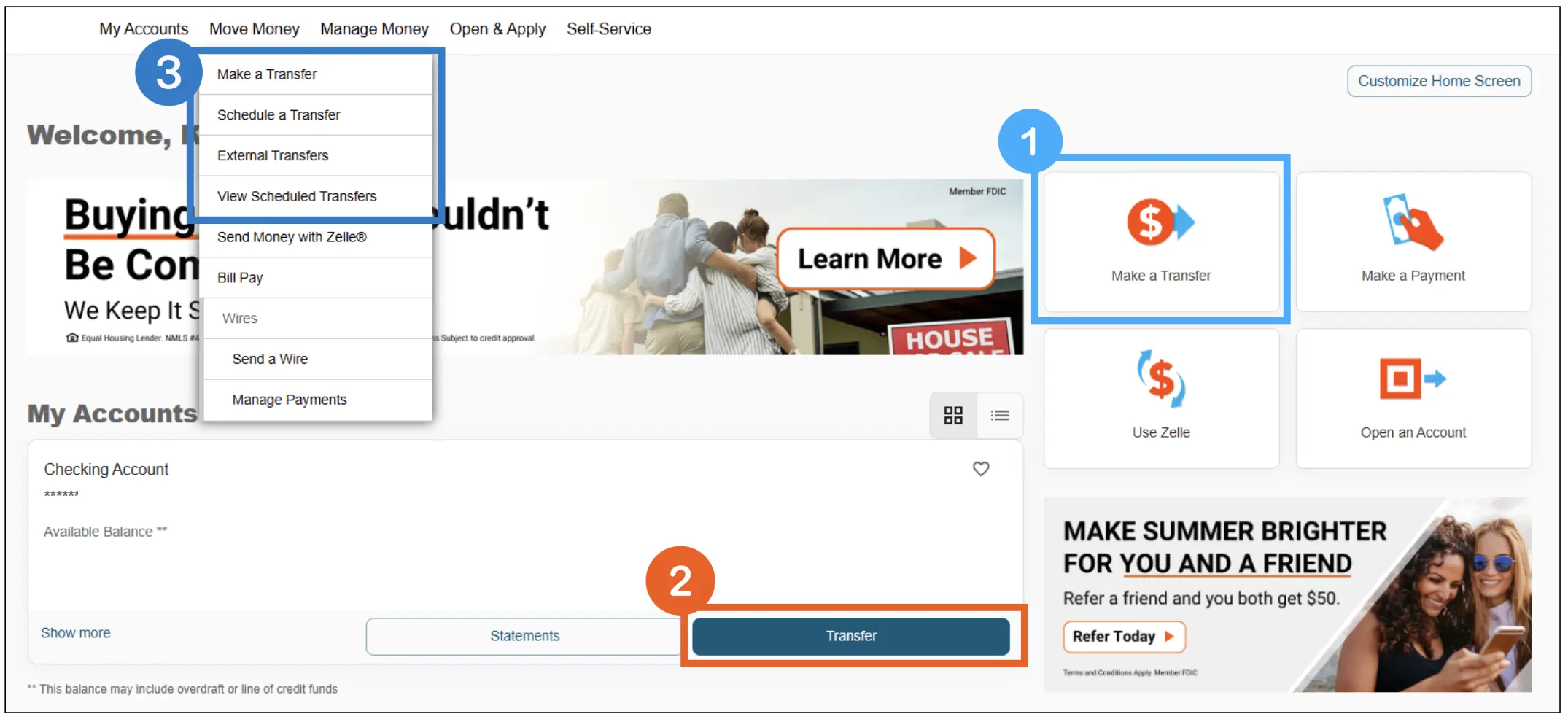
Get started with these simple steps:

Online Banking: 
  1. From the 4-pack > Select Make a Transfer 
  2. From Your Account Card > Select Transfer 
  3. From Move Money > Select your Transfer option 
Mobile: 
  • From Move Money > Internal or External Transfers 
  • From your Account Card > Select Transfer
Online Banking screenshot showing how to find Transfers

Prefer Personal Assistance?

Our team of dedicated professionals are here to support you.