
Locations Help

Personal Online Banking Login

Refer A Friend & Earn Up To $500

Business Banking

Login

Mortgage Statements

Login

Credit Card Logins

Go

Wealth - Trust & Investments

Login

Wealth - Raymond James

Login

Wealth - (RPS) Epic Advisor

Login

From the cable and phone bill to insurance and membership payments, save time and stay organized by making your payments all in one place with Bill Pay.

With Bill Pay, you can:

  • Schedule automatic or one-time payments
  • View and keep track of payments within your payment history
  • Set up and view eBills for payees offering electronic billing
  • Get payment notifications
  • Pay bills at home, at the office or on the go with our mobile app

Plus, there's no need for stamps or a trip to the post office.

Start Using Bill Pay

Download the Midland App or enroll in Online Banking to get started.

After You Enroll, Follow These Steps to Access Bill Pay

Online Banking:
1. From the 4-pack > Make a Payment
2. From Move Money > Bill Pay
3. From the Widget Wallet > Bill Pay

Mobile App:
From Move Money > Bill Pay
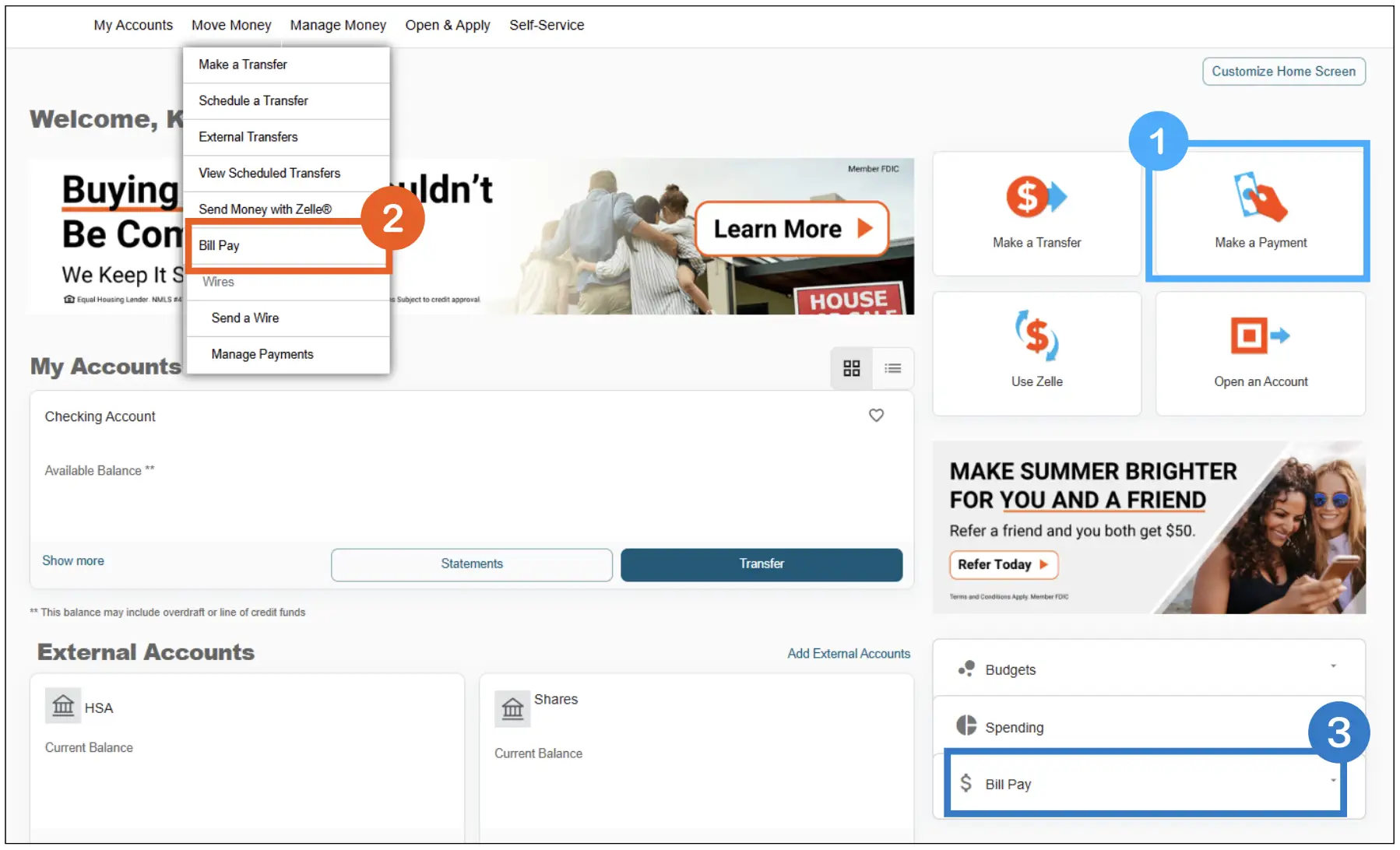
Online banking homepage with overlays to show were to access bill pay

Frequently Asked Questions

Can I use Bill Pay in Online Banking and the Mobile App?

Yes. Bill Pay is available in both Online Banking and the Mobile App.

Is there a fee to use Bill Pay?

No. Bill Pay is free for current online banking and mobile app users.

What accounts can I use to make payments?

Bill Pay can be used with eligible checking accounts. 

How do I add a payee?

Select Add Payee, search for the company or person you’d like to pay, enter the required details, and click Save.

What if I don’t see my payee listed?

If your payee doesn’t appear in the search results, you can manually enter their billing information to add them.

Where can I view my current payees?

Select View All Payees to see a complete list of your existing payees.

Can I schedule recurring payments?

Yes. You can set up one-time or recurring payments and choose how often the payment should be sent.

How can I view my recent payments?

Select View All Payments to see your payment history. You can sort by date, status, category, account, or amount. You can also filter results by payment date, amount, category, or the account used to make the payment.

Can I set up alerts for my bills?

Yes. From the Bill Pay screen, select Alerts and choose the notifications you’d like to receive.

Is Bill Pay secure?

Yes. Bill Pay is protected by the same security features used in Online Banking and the Mobile App, including encryption and secure login credentials.

Prefer Personal Assistance?

Our team of dedicated professionals are here to support you.